WordPress Migration & Maintenance for 100+ Websites
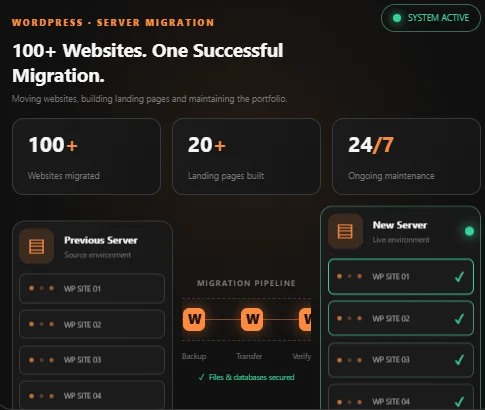
Moved 100+ WordPress websites to a new server, built 20+ custom landing pages and handled ongoing maintenance across the whole portfolio.
Overview
A large-scale WordPress migration and maintenance project involving more than 100 websites moved from one server to another. Alongside the migration work, I designed and developed more than 20 custom landing pages and handled ongoing maintenance across the website portfolio.
The work covered the complete migration lifecycle, from assessing existing websites and preparing backups to transferring files and databases, configuring the new server, testing functionality, and resolving issues after deployment. The objective was to move the entire portfolio reliably while preserving website functionality, existing URLs, and search visibility.
Results at a Glance
- 100+ WordPress websites: Migrated from the previous server to a new hosting environment.
- 20+ custom landing pages: Designed and developed for different services, campaigns, and business goals.
- Ongoing maintenance: Supported the website portfolio after migration.
- End-to-end migration: Handled website preparation, backup, transfer, configuration, testing, and deployment.
- Consistent workflow: Applied a repeatable migration and verification process across the portfolio.
- SEO considerations: Focused on preserving existing URLs, accessibility, and search engine visibility during the move.
The Challenge
Migrating a single WordPress website can be straightforward, but moving more than 100 websites introduces a different level of complexity. Every website can have its own theme, plugin configuration, database structure, media library, custom functionality, and server requirements.
A problem with one website's configuration can result in broken pages, missing images, database connection errors, non-functional forms, or plugin conflicts. Handling the migration at this scale required a consistent process while still accounting for the differences between individual websites.
Another important consideration was minimizing disruption. Existing websites needed to remain accessible, important functionality had to continue working, and changes to hosting or domain configuration needed to avoid unnecessary SEO problems.
Large-Scale WordPress Migration
The migration was handled through a structured workflow designed to keep websites organized and reduce the risk of missing important files, settings, or functionality.
- Website inventory and assessment: Reviewed the website portfolio and identified the individual websites, their configurations, and the components that needed to be transferred.
- Backup preparation: Prepared backups of website files and databases before migration to provide a recovery point if something went wrong.
- File and database transfer: Transferred WordPress core files, themes, plugins, uploads, and database content to the new server.
- Server and website configuration: Updated the required configuration settings, database connections, and hosting-related settings to make each website work in its new environment.
- Domain and SSL configuration: Handled the relevant DNS and SSL configuration required for websites to operate securely on the new server.
- Website functionality testing: Checked important pages, navigation, images, forms, login functionality, and essential plugins to identify problems after restoration.
- Deployment and verification: Switched websites to the new server, verified that they loaded correctly, and addressed issues discovered during post-migration checks.
Rather than treating the portfolio as one large transfer, each website required individual attention and verification. This helped maintain consistency while accounting for the different configurations across the sites.
20+ Custom WordPress Landing Pages
In addition to migration work, I designed and developed more than 20 custom landing pages in WordPress. Each page was created around a specific service, campaign, or business objective rather than relying on one generic layout for every use case.
The landing pages focused on presenting information clearly, communicating the value of a service, and guiding visitors toward a specific action, such as submitting an enquiry or contacting the business.
- Purpose-driven layouts: Structured each page around its intended audience and conversion goal.
- Clear content hierarchy: Organized headings, service information, supporting content, and calls to action.
- Responsive design: Created layouts that adapt to desktop, tablet, and mobile screens.
- Consistent presentation: Maintained a professional visual structure while accommodating different page requirements.
- WordPress integration: Built the pages within the existing WordPress environments.
This work extended beyond simply creating page layouts. Each landing page needed to fit the website's existing design and content while making the intended action easy for visitors to understand.
Ongoing WordPress Maintenance
The work continued after the migration. Maintaining more than 100 websites requires ongoing attention to compatibility, website functionality, content, and general technical issues.
Maintenance involved supporting the website portfolio and addressing issues as they appeared, helping ensure that websites continued operating correctly after being moved to the new server.
- Technical troubleshooting: Investigating and resolving website errors and functionality issues.
- WordPress support: Handling website-level maintenance and configuration requirements.
- Plugin and theme compatibility: Addressing compatibility problems affecting website functionality.
- Content and layout updates: Making requested changes to website pages and presentation.
- Post-migration support: Checking migrated websites and resolving issues discovered after deployment.
The focus was on keeping the entire portfolio manageable and reducing disruption to the businesses relying on these websites.
Migration and SEO Preservation
A website migration can affect organic search performance if important technical details are overlooked. Changes to URLs, redirects, SSL, indexing settings, or website availability can prevent search engines from accessing pages as expected.
SEO considerations were therefore part of the migration process. Preserving existing URL structures where possible, maintaining secure website access, and checking that important pages remained accessible helped reduce avoidable migration-related risks.
The broader technical workflow also connects with work on the Company Portal and Workflow Automation project, which includes indexing checks for published website content.
A migration alone cannot guarantee unchanged rankings, but careful technical handling helps protect the factors that allow existing pages to remain discoverable.
Tools and Technical Skills
- CMS: WordPress
- Backend: PHP
- Database: MySQL
- Server operations: Website migration, hosting configuration, and deployment.
- Domain management: DNS and SSL configuration.
- Frontend development: Responsive landing page design and development.
- Website maintenance: Troubleshooting, compatibility checks, and ongoing support.
My Role
I handled the migration of more than 100 WordPress websites from the previous server to the new hosting environment, covering website preparation, backups, file and database transfers, configuration, deployment, and functionality checks.
I also designed and developed more than 20 custom WordPress landing pages and provided ongoing maintenance across the website portfolio. My responsibilities included troubleshooting technical issues, handling website updates, and supporting the continued operation of the migrated websites.
The project involved both large-scale infrastructure-related work and hands-on WordPress development, requiring consistency across a diverse portfolio of websites.
Frequently asked questions
What does a WordPress migration involve?
Backing up files and the database, restoring them on the new server, updating configuration and SSL, testing, and switching the domain over.
How do you protect search rankings during a migration?
By keeping URLs unchanged, setting up SSL correctly and checking that pages remain accessible and indexable after the move.
What do you mainly use to make landing pages in WordPress?
I mainly use Elementor to build WordPress landing pages, but I'm also comfortable working with custom HTML, CSS, and JavaScript whenever a project requires more flexibility or advanced customization.
What do I need to provide?
Access to the current hosting and the new server, plus a list of the sites to move.
More projects

ERP System: Accounting, Attendance & Insurance Management
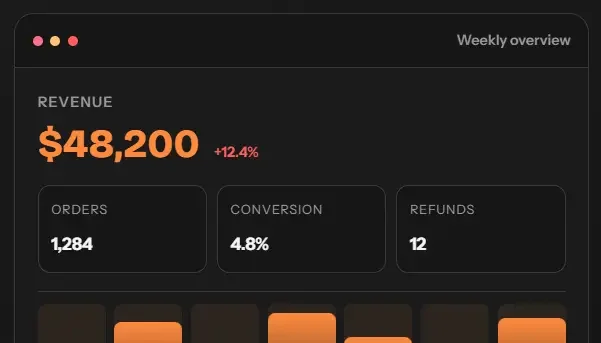
Modular Laravel ERP I maintained and extended for Indus BPO: accounting, projects, attendance, insurance AMS, tax and USD/PKR quote calculators.

Reusable E-commerce Platform with Admin Panel: Bakery & Herbal Stores
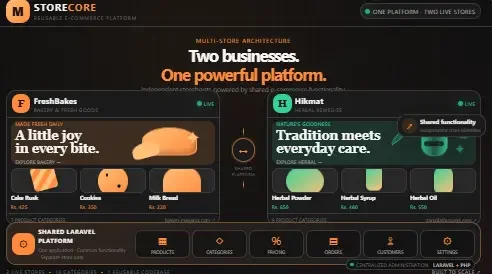
Reusable Laravel e-commerce platform with one admin panel, deployed for a bakery shop and an herbal remedies store in Pakistan.

ALCINSURE: Insurance Operations & Agency Management System
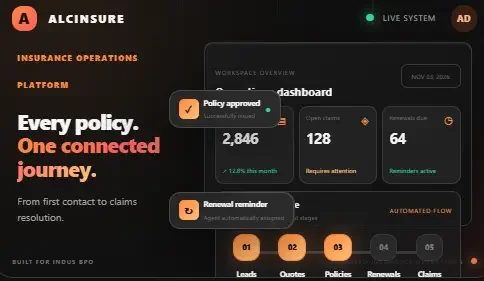
Insurance operations platform in Laravel: leads, quotes, policies, renewals and claims in one portal with live SLA tracking. Built for Indus BPO.