Company Portal: Workflow Automation Platform
Internal Laravel portal automating accounting, CRM, inventory and QC, plus AI email handling across 90+ mailboxes and auto-publishing to WordPress.
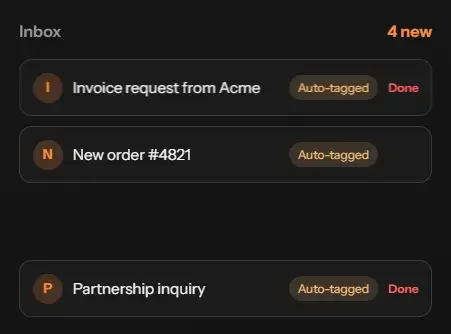
- I Invoice request from Acme Auto-tagged Done
- N New order #4821 Auto-tagged Done
- S Support: refund status Auto-tagged Done
- P Partnership inquiry Auto-tagged Done
Results at a glance
A centralized Laravel-based operations portal built for Globex IT Solutions, bringing email management, CRM, inventory, content automation, document handling and quality control into one system. It automates repetitive workflows across teams, 90+ mailboxes and multiple WordPress websites.
- 90+ workspace mailboxes managed from one portal
- Up to 700,000 emails handled per month
- 6 core modules: Accountant, Processor, CRM, Inventory, Query and QC
- One-click email campaigns and automated responses
- AI-written and automatically published WordPress content
- Complete document, communication and activity history
The challenge
Managing operations across multiple teams, mailboxes and websites involved a large amount of repetitive manual work. Emails needed to be sorted and answered, content had to be written and published, documents required tracking, and published pages needed indexing checks.
Although each task was manageable individually, together they created operational bottlenecks and made scaling increasingly difficult.
The objective was to build a single centralized portal that automated these workflows, connected different departments and maintained a complete record of operational activity.
Core modules
The portal is organized into six interconnected modules, each designed around a specific operational workflow.
- Accountant. Manages financial records, expenses and reporting.
- Processor. Handles incoming work and orders through defined processing stages.
- CRM. Organizes contacts, conversations and outreach activities.
- Inventory. Manages inventory records, stock information and updates.
- Query. Handles incoming questions, requests and their processing.
- QC. Performs quality checks before work is approved or published.
All six modules operate within a centralized system with role-based access control, team-specific dashboards and REST API integrations with third-party services.
Content automation and WordPress publishing
The portal uses AI to generate website content, process it through quality checks and publish approved content directly to connected WordPress websites.
AI-powered website categorization helps identify the appropriate categories for different websites, making content distribution and outreach more targeted.
This eliminates much of the manual process of drafting, formatting, uploading and publishing articles across multiple websites.
Email automation across 90+ mailboxes
The portal centralizes more than 90 Google Workspace mailboxes, with the capacity to handle up to 700,000 emails per month. Instead of managing each inbox separately, teams can control email operations from one interface.
- One-click sending. Launch email campaigns and outreach runs through a single action.
- Distributed sending. Email volume is spread across multiple mailboxes. At 700,000 emails per month across 90 mailboxes, the average is approximately 260 emails per mailbox per day.
- Automatic responses. Incoming emails are parsed, routed to the appropriate tasks and answered automatically, with AI-assisted reply generation.
- Complete communication history. Messages and replies are logged against their relevant records for future reference.
For a deeper look at the inbox automation workflow, see How I automated 90+ inboxes .
AI-powered outreach and responses
AI is integrated throughout the portal to assist with communication, website categorization and outreach workflows. It helps generate email responses, classify websites and identify relevant targets for campaigns.
Rather than sending generic messages to an entire contact list, outreach can be organized by website category, ensuring that communication is more relevant to its intended recipients.
Document handling and history
The portal centralizes document handling and maintains a detailed history of changes and actions. Each activity is recorded to provide visibility into who performed an action and when it happened.
This creates a reliable audit trail for operational reviews, team handovers and dispute resolution, without relying on scattered records or manual tracking.
Scraping and indexing checks
The platform includes automated scraping of live website articles, with handling for common scraping failures such as website layout changes, blocked requests and malformed content.
After publishing, indexing checks monitor whether pages have been discovered by search engines. This helps identify indexing issues early and provides better visibility into published content.
The scraping capabilities also connect to large-scale collection workflows, including the Manga Data Collection System .
Architecture and technology stack
The application combines a centralized Laravel backend, relational database, WordPress integrations and AI-powered services to coordinate workflows across multiple departments.
- Laravel and PHP: Core application and business logic
- MySQL: Operational records and structured data
- WordPress API: Automated website content publishing
- REST APIs: Third-party service integrations
- Role-based access control: Team permissions and access management
- AI integration: Content generation, categorization and responses
My role
I designed and developed the complete operations portal for Globex IT Solutions, bringing together the business modules, automation workflows and third-party integrations into one centralized platform.
- Designed and developed all six core operational modules
- Built centralized email management and campaign automation
- Implemented automated email parsing and AI-assisted responses
- Integrated AI-powered content generation and categorization
- Developed automated WordPress publishing workflows
- Implemented document management and activity history
- Built website scraping and search indexing checks
- Integrated REST APIs and role-based access control
Frequently asked questions
What is the company portal?
An internal operations platform that automates workflows across accounting, CRM, inventory, queries, QC and email, with AI-powered content and outreach.
Which modules does it include?
Accountant, processor, CRM, inventory, query and QC, with dashboards and role-based access.
How many mailboxes does it manage?
More than 90 workspace mailboxes, from a single portal.
How many emails can it send per month?
Capacity is up to 700,000 emails per month, spread across the mailboxes.
How does it avoid sending spam?
Sending is distributed across many mailboxes so each stays at a modest daily volume, and outreach is targeted by website category rather than blasted to a general list.
Can it reply to emails automatically?
Yes. Incoming emails are parsed, routed and answered automatically, with AI helping to write responses.
How does the one-click emailing work?
A single action starts an email run, and the portal handles sending, spreading the load and logging results.
Can it automatically publish AI-generated content to WordPress after writing it?
Yes. Content is written with AI, checked, and published automatically to WordPress websites.
How are documents and history handled?
Documents are processed automatically and every change and message is logged, giving a full history.
What does the AI do?
It drafts email responses, helps write website content, categorizes websites and supports outreach.
Does it check whether the pages are indexed by Google?
The user simply clicks Start, and the system automatically handles the entire process. AI researches and writes the article, checks for issues, and continuously improves the content until the best possible version is ready. Once finalized, it automatically publishes the article to the connected website (WordPress or another platform), submits the URL to Google for indexing, and then manually verifies whether the page has been successfully indexed on Google. If the page is not indexed, the system identifies potential issues, takes the necessary steps, and continues monitoring until indexing is confirmed. The entire workflow, from content creation to publishing and indexing verification, should run automatically with just one click and without requiring manual intervention.
More projects

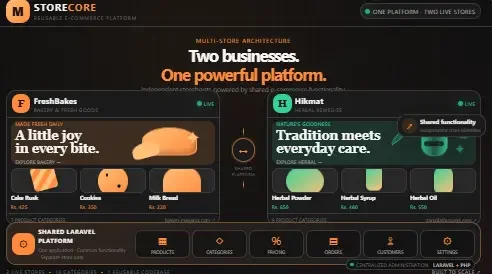
Reusable E-commerce Platform with Admin Panel: Bakery & Herbal Stores
Reusable Laravel e-commerce platform with one admin panel, deployed for a bakery shop and an herbal remedies store in Pakistan.

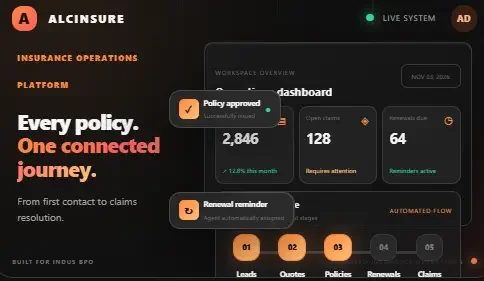
ALCINSURE: Insurance Operations & Agency Management System
Insurance operations platform in Laravel: leads, quotes, policies, renewals and claims in one portal with live SLA tracking. Built for Indus BPO.

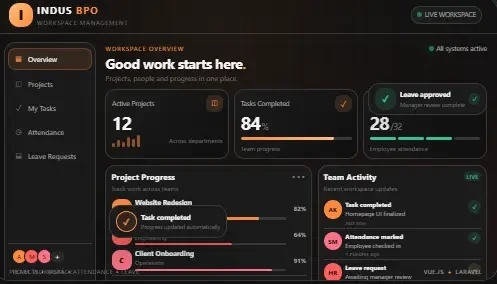
Project Management System with Attendance & Leave Management
Vue and Laravel system to create projects, assign tasks, track attendance and approve leave, with admin, manager and user roles. Built for Indus BPO.